
bots.json Configuration
Configure bots via ~/.botmux/bots.json. Run botmux setup to create it interactively, or edit it by hand. The file is an array; each element is a bot (in production, one bot maps to one dedicated daemon process).
Most fields are optional — just
larkAppId/larkAppSecretis enough to run; add the rest as needed. Applies to: manually tuning CLI / model / working dir / permissions / sandbox, etc.; for everyday config the dashboard's Bot Config page is preferred (it edits the samebots.json). Runbotmux restartto apply changes.
There are many fields, listed below grouped by purpose. The vast majority are optional — just larkAppId / larkAppSecret is enough to get running, and you add the rest as needed.
Required
CLI and model
nativeSubagentRuntime rewrites only new subagents created through Trae's native spawn_agent; it does not alter the parent agent itself. An absent dimension passes through the subagent request, while custom replaces it with a fixed value. When both a custom model and custom effort are configured, BotMux validates that Trae supports the combination. Switching the bot to another CLI removes this field automatically. In the Dashboard, “Pass through request” corresponds to an absent dimension. This policy is behavior configuration and is copied when cloning a bot, but it is intentionally excluded from portable Agent presets. Legacy mode: "inherit" values are invalid and are not applied.
Per-group defaults for new topics
Each bot owns its own groupDefaultModels, keyed by chat ID and CLI. The Dashboard follows the bot’s Agent CLI and shows only its model and reasoning-effort dropdowns, reusing Agent model discovery and effort validation. Both fields can inherit the Agent defaults. Custom models and legacy string-valued entries remain supported. A new topic captures these settings when its session is created; later edits or clearing the group configuration do not alter that topic on restart or resume. Selecting a CLI uses only its matching entry. Topics without a group override retain the existing live bot-model fallback. Direct messages, chat-scoped group sessions, and adopted external sessions do not use the snapshot.
Precedence: explicit trigger model > captured group model > matching bot model > existing cross-CLI fallback. Reasoning effort is also captured for new topics; explicit trigger settings can override it. The CLI and runtime remain unchanged. Dashboard saves apply without restarting the daemon. Choosing inheritance removes the corresponding override for future topics while retaining historical settings for other CLIs; manual file edits follow the existing configuration-loading procedure.
Automatic CLI quota handoff
quotaFallbackBot lets the daemon post one fixed, real @ to a backup Bot at the original session landing point once the current CLI is confirmed quota-limited. It does not call the exhausted primary model, and the existing limit card and owner notification remain unchanged.
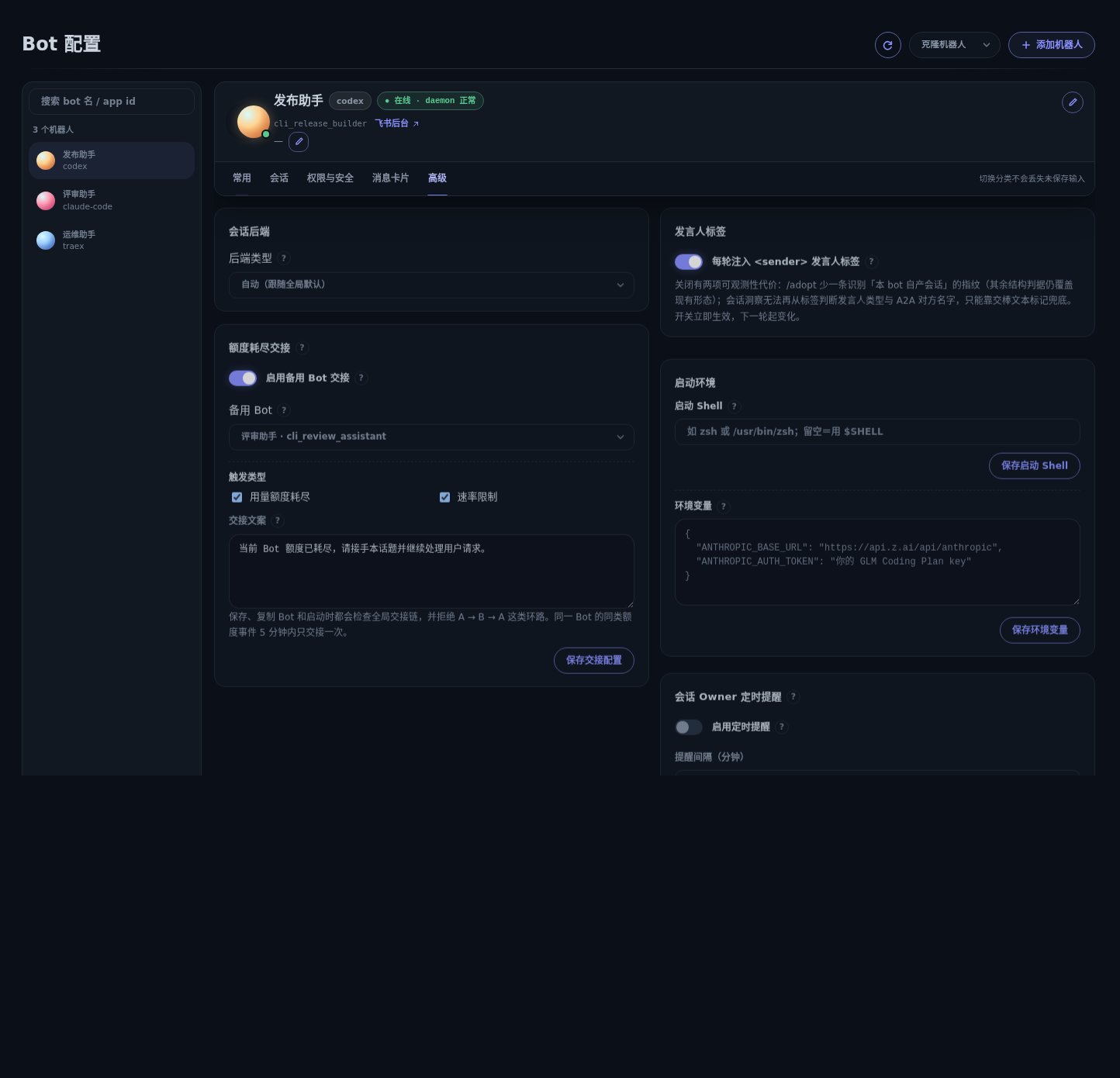
targetAppIdis the backup Bot's stable Lark App ID. Never configure or copy anou_xxx: open IDs are scoped to the sending application. At send time, the daemon resolves a receiver-scoped mention handle from the current chat's live membership.kindsacceptsusageand/orrate; omitting it enables both. Omittingmessageuses the built-in Chinese handoff text. The message is limited to 1000 characters and must be non-blank without a native<at>tag.- The target must be a locally configured Bot that is currently in the chat. Cross-deployment/team-directory targets are not supported yet because the daemon cannot safely prove which live
open_idbelongs to a remote App ID. Non-local, self, absent, and live-resolution failures all fail closed. - Save and Bot clone validate the complete impending handoff graph and reject self-reference or cycles such as
A → B → C → A; an acyclic chain may continue cascading. If a manual edit introduces a cycle,botmux start/restartskips Bots in that cycle while still starting the Dashboard and unrelated Bots. Bot Config marks the skipped Bots and lets an operator repair the edge under Advanced → Quota-limit handoff; restart after saving to bring them online. A supervisor-driven daemon reload still disables cyclic handoff at load time and logs a warning so malformed configuration cannot spread its impact.
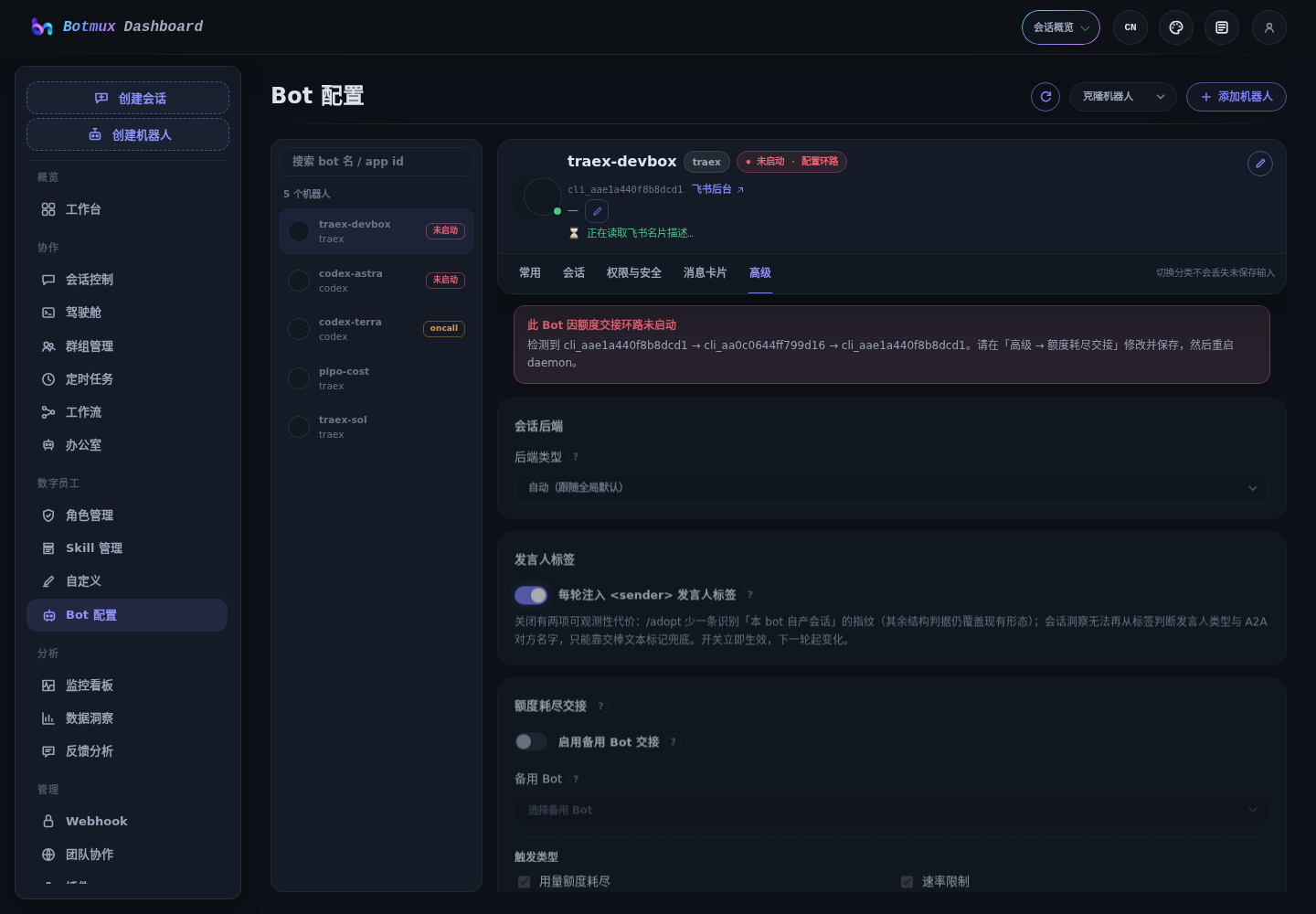
- Within a daemon, the source Bot and limit kind are deduplicated across all sessions for five minutes. A failed identity lookup or delivery still occupies that window to prevent a short retry storm.
- Chat-scoped sessions land in the original chat and thread-scoped sessions land in the original thread. The backup Bot reads context from the existing history. Restoring a daemon with an already-limited session does not backfill an old handoff.
- The whole feature is inert when the block is absent or
enabledis not exactlytrue, preserving previous behavior. Configure it under Dashboard "Bot Configuration → Advanced → Quota-limit handoff," or editbots.jsonmanually.
Codex-compatible distributions
An independently released CLI that preserves Codex's arguments, interaction, rollout / resume, and authentication semantics does not need a new cliId. Keep cliId: "codex" as the protocol adapter and describe the concrete runtime separately:
idis a stable identity using letters, numbers,.,_, or-, up to 64 characters. Changing it is treated as switching distributions.executableis one executable name or path, not a shell command; do not append arguments. The Dashboard performs a read-only--versionprobe before saving, and its output must contain a recognizableX.Y.Zversion.displayNamecontrols cards, status, and Dashboard labels only; it defaults toid.update.provideris one ofauto,self,npm, ornone.autotrusts only a unique npm package proven to own that exact binary. If no source can be established, the runtime is shown as unmanaged and is never compared with official Codex. Onlyselfuses the CLI's structured doctor data, and its current version must match--version;npmrequires the distribution's ownpackageName;nonedisables update checks for that runtime.cliRuntimecurrently applies only tocliId: "codex"and cannot be combined withwrapperCli. BotMux writers generate acliPathOverridedowngrade shadow that exactly matchesexecutable: new versions usecliRuntimeas canonical, while old versions still launch the same binary from the shadow. Manual configs must include the same exact shadow as shown above; a missing or mismatched value fails validation so an accepted config is always safe to roll back. Wrappers and gateways keep using the legacy entry-point mechanism below.- Existing
cliPathOverrideconfigs remain launch-compatible and receive the same safeautoupdate behavior. The Dashboard shows them in a read-only compatibility state: model-only saves preserve the old entry point, choosing Official Codex explicitly clears it, and choosing Custom Compatible migrates it tocliRuntime. Because a raw path does not assert the full compatibility contract, Codex RPC enhancements remain disabled.
A session freezes its runtime snapshot when created. Model-only changes affect new sessions; switching CLI, runtime, or wrapper immediately closes active sessions that still use the old launch identity so they cannot lazy-resume into the wrong distribution. Existing sessions are never silently switched to another runtime.
Run a bot on GLM / a third-party provider (per-bot env)
Run one bot on a GLM Coding Plan (or any Anthropic-compatible provider) while another keeps using official Claude — give the former an env:
- For GLM in China, use
https://open.bigmodel.cn/api/anthropicforANTHROPIC_BASE_URL. - For an OpenAI-protocol CLI like Codex, set
OPENAI_BASE_URL/OPENAI_API_KEY(the provider's OpenAI-compatible endpoint) instead ofANTHROPIC_*. - Isolation: env is injected per-session into the CLI process, consistently across backends (tmux / zellij inject it per-pane, never into the shared server env), so one bot's provider config can't leak into another's.
- Security: values live in
bots.jsonand the process environment in plaintext — not a secret vault; chat configuration queries mask values and Dashboard returns names only. - Takes effect from the next session.
Clean Codex App input (experimental)
codexAppCleanInput keeps user messages shown in Codex App clean while preserving the context Botmux needs when invoking the model. It defaults to false / off; when disabled, Botmux keeps the original combined-prompt behavior unchanged.
An owner or allowedUsers member can hot-update it with /botconfig; no daemon restart is required:
You can also add it to the corresponding bot entry directly (manual bots.json edits still require the restart described at the end of this page):
- The flag applies only to Botmux-managed sessions whose actual CLI is
codex-app; other CLIs and externally bridged/adoptsessions are unaffected. A session-frozen CLI takes precedence over a later bot-default CLI change. - When enabled, user-authored turns use the original text as the Codex App text
UserMessage; Botmux-authored synthetic turns such as external triggers and document prewarm use a short readable label. Message-level sender, mentions, attachment paths, quotes, role, whiteboard, Skills, and synthetic-turn instructions primarily move to hiddenadditionalContext. Readable absolute-path images are also sent aslocalImage; missing, relative, or unreadable images skip the native image item with a diagnostic while their attachment path remains in context. - A detectable Codex CLI
>= 0.135enables clean text plusadditionalContext;>= 0.136also attaches a separateclientUserMessageId. Older or unknown versions use the legacy combined prompt directly. - The runner retries the legacy prompt once only when app-server explicitly rejects
additionalContext/clientUserMessageIdbeforeturn/started, then disables clean mode for that runner lifetime. Network, timeout, model, and generic turn errors are never auto-retried, avoiding duplicate work. - A
/botconfigchange is sampled at the next dispatch to the Codex worker. For ordinary live messages this is normally the next message; a first turn waiting on repo selection is sampled when the repo is committed. Already queued or running turns are not rewritten, and existing history is never backfilled. additionalContextis omitted from the ordinary Codex App user-message bubble, but it may still be retained in raw rollout or diagnostic records. When enabled, Botmux also keeps the legacy prompt and structured sidecar for compatibility fallback andretry_last_task. This feature improves App presentation and ordinary history reading; it is not a privacy-erasure or security-redaction mechanism.
Codex App browser bridge (experimental)
Install the browser runtime bundled with the Codex desktop app. The bridge prefers mcp_servers.node_repl, but locates the installed runtime when the desktop removes that MCP registration; set BOTMUX_CODEX_NODE_REPL_PATH for a custom installation. Identity, site safety status, and feature configuration use the official authenticated request channel. The bridge does not read or store login tokens, and fails closed when the runtime or authentication is unavailable.
This option addresses one narrow gap: Codex running through Botmux's app-server path does not otherwise inherit the Chrome tool built into Codex App. The bridge belongs entirely to Botmux and has no dependency on a project repository, Harness, or local-proxy setup.
- Install and enable the Codex browser extension in Chrome / Edge under the same OS user first. Botmux selects the newest complete official plugin under
CODEX_HOME(or~/.codex) automatically; use an absolutepluginRootonly for a maintained custom location. - The setting registers the
botmux_browserdynamic tool when starting or resuming a Codex App thread. Restart or resume an already-running runner to load the updated tool definition. - The bridge probes capabilities per tab. It prefers the accessibility tree, falls back automatically to visible-DOM / Playwright-DOM snapshots when AX is unavailable, and exposes typed Playwright locator, DOM, and coordinate operations. A backend without
tab.axno longer breaks the entire Chrome connection. - Browser Use safety requests for origin access, uploads, downloads, and similar actions block the operation and appear as Lark authorization cards. Only users accepted by Botmux's
canTalkcheck can choose session approval, persistent approval, or denial; Botmux ask records the answer and reviewer. A plain approval is also scoped to the current runner session and is reused for the same origin, operation type, and risk context; a different origin, operation type, risk context, or new session requires confirmation again. Denial, timeout, or daemon unavailability fails closed. - The tool does not expose arbitrary JavaScript, raw CDP, cookies, local storage, browser history, or clipboard. Uploads/downloads run only through Browser Use's controlled file chooser and safety checks. Secure browser-auth flows involving credentials never downgrade to an ordinary Lark card and require a client with a secure credential broker.
- Each Botmux runner owns isolated browser-session state. The feature is off by default, so unconfigured bots retain their existing launch arguments and behavior.
- It currently cannot be combined with
existingAppServer,sandbox, orreadIsolation; conflicting configuration fails at startup instead of running with an incomplete isolation boundary.
Working directory
Permissions and authorization
File sandbox
ZMX cannot enforce the file sandbox or effective read isolation, so configurations that enable those boundaries fail closed; see ZMX backend boundaries.
Cards and terminal
Prompt injection
replyDelivery: "transcript"
claude-code defaults to transcript; the other supported CLIs need it set explicitly. Once active it changes three things for that bot's sessions:
- The system prompt never mentions
botmux send: the intro becomes "your final assistant message is automatically forwarded back to Lark by botmux — just answer directly"; the heredoc rule, the @ decision gate, the attachment usage and the<identity>rule "collaboration requiresbotmux send --mention" are all dropped, leaving onlybotmux history/botmux bots listand theBOTMUX_NOTHING_TO_SENDsilence sentinel. For the cases that genuinely needbotmux send(attachments, cross-bot @) the model can discover the built-in skill (botmux-sendunder--plugin-dir) on its own; - The per-turn
<botmux_reminder>is no longer injected (one less reminder block per prompt); - Solo sessions are unwrapped: in a DM, or a plain 1:1 group whose only participants are the owner and this bot, each turn drops the
<user_message>wrapper and the<sender/>tag, so the model sees bare text. Topic groups, multi-member groups, and turns spoken by anyone other than the owner never count as solo; wrapper and tag stay as before.
Supported CLIs: claude-code, plus the structured-transcript bridge CLIs codex / traex / coco / hermes / mtr / pi / oh-my-pi / ebsd / grok. Other CLIs (e.g. cursor, gemini) have no transcript capture, so both /botconfig set and the dashboard reject the value (reply_delivery_unsupported); if the field is already persisted and cli is later switched to an unsupported CLI, the runtime falls back to send (one warn in the log) rather than losing replies.
Hot-updatable by the owner / allowedUsers via /botconfig:
- Two activation points: the per-turn envelope (reminder / wrapper /
<sender/>) applies from the next turn; the system prompt is injected at spawn time, so a running session needs/restartto pick up the new value, while new sessions use it directly. - Observability cost: the bare-text shape of a solo session has no
<user_message>/<sender>structure, so/adoptno longer recognizes such sessions as botmux's own (the same class of cost assenderTag: false). - The dashboard "Reply Delivery → Transcript reply mode" toggle saves this field; it is disabled with an explanation when the current CLI does not support it.
senderTag: false
With it off the model cannot see speaker identity: in a multi-person chat it cannot tell participants apart or address them by name. Useful for a CLI whose model copies the tag into its reply body (e.g. cursor — see the <sender_note> anti-echo hint, which disappears together with the tag), or when you do not want per-message identity written into the CLI transcript.
Hot-updatable by the owner / allowedUsers via /botconfig, no daemon restart:
Or write it directly into the bot's config:
botmux send --mention-backis unaffected: it reads the daemon-side record of this turn's triggerer (replyTargets[turnId].senderOpenId), a separate path from this prompt tag.- Turning it off costs two observability signals: (1)
/adoptloses one fingerprint for recognizing this bot's own sessions (the remaining structural checks still cover every prompt shape we ship, so self-produced sessions are not listed as external); (2) dashboard session insight can no longer read speaker type or A2A agent name from the tag, falling back to the[来自 … 的 @mention]handoff marker — with no such marker, that turn shows no source. - Applies immediately (from the next turn); it does not rewrite queued or in-flight turns, nor backfill existing history.
- The dashboard "Speaker Tag" toggle saves this field.
Proactive start
Group message listener
Have a bot actively watch a group: matching group messages start a session automatically, no @ required. The classic use is alert operations — your monitoring/alerting system usually already has its own Lark bot posting alerts into a group, so just add this bot to that group and enable the listener; every alert triggers an investigation session, with no need to set up a separate Webhook integration point.
Configure it per-group in the Dashboard "Roles → Message Listener" tab (with Preview of the last 24h of matches and a dry run to validate); or write messageListeners directly in bots.json (keyed by chat_id, valued by the config below):
Conventions and limits (V1):
- Top-level group messages only: ordinary replies inside an existing topic are not handled; a message that explicitly @s this bot still goes through normal @ routing (no double trigger).
- One session per matched message, replied to in a new topic beneath it.
- Delivery: the realtime event path covers messages Lark pushes; messages from other bots, and non-@ messages, are backfilled by a history poll roughly every 30s (so up to ~30s of latency). That's why listening to a third-party alert bot works most reliably in blacklist mode (
all_except_excluded+ include"bot") — whitelist matches byopen_id, but the history API reports third-party bots byapp_id, which may not resolve to anopen_idand therefore won't match.
Summary command
Example:
- Only the explicit
@bot /summarycommand triggers a summary. Messages that do not mention the bot still follow the existing group/topic routing rules and are not woken up by keywords. - The dashboard "/summary Range" controls this
summaryRangefield; the "Enable memory" toggle and "Memory file path" input savesummaryMemoryandsummaryMemoryPathrespectively. - If an earlier
@same bot /summaryexists before the current trigger, the summary window includes only messages after that earlier command and up to the current trigger; otherwise botmux falls back tolimit/sinceHours. limitandsinceHoursare safety caps for the default (no explicit boundary) summary window. If both are0, that dimension is not limited. An explicit boundary intentionally takes precedence over these caps: whensummaryMemoryis on and/summarycarries boundary text, botmux honors the user's explicit "start from this message" intent and includes everything from the matched boundary onward — in a regular grouplimitstill bounds the scan, but a boundary older thansinceHours, and any arbitrarily old boundary in a topic group, is accepted and may exceed the default configured range. If you do not want a bot to read in very old content, the reliable approach is to omit the boundary text; in a regular group you can also lowerlimitto bound the scan (butsinceHours, and any boundary in a topic group, are not constrained by the configured range).- Only when
summaryMemoryis enabled, text following the/summarycommand is treated as a hard boundary: it locates the most recent message before the trigger that contains that text and summarizes only from there up to the current trigger; if the boundary is not found in the scanned history, botmux does not fall back to a wider range but hands the agent a "boundary not found" error together with an empty history (the memory write instruction still runs). WhensummaryMemoryis off, text after/summaryis only a focus hint for the summary and the history window still followssummaryRange. - The memory file is written by the agent within its working directory. If the bot has sandbox enabled and
summaryMemoryPathpoints outside the working directory (an absolute path, or a relative path that escapes via../), add the file's existing parent directory tosandboxPaths.readWrite; the worker filters out paths that do not yet exist at spawn time, and a new memory file usually does not exist yet, so adding only the file path itself is dropped (unless the file is pre-created). Otherwise the write may be denied by the sandbox.
Legacy content trigger config
Voice
Meeting listener roles and group placement
vcMeetingAgent.meetingConsumer.consumerProfiles defines reusable meeting-listener roles. responseMode controls whether automatic model output is authorized; listenerDelivery.placement independently controls where authorized output appears:
The Dashboard meeting-role editor includes a local built-in template library: Important information sync, Meeting minutes and action items, Meeting facilitator, Solution review and risk challenge, and Interview and requirement insights. “Use template” copies the selected template into a normal, fully editable profile; later template changes never overwrite user configuration. The catalog has stable template IDs, versions, and source metadata so a community source can use the same model later. This release makes no network request and uploads no usage data, so popularity rankings are intentionally unavailable.
silent: automatic model output stays hidden.listener_thread: automatic output may be sent to the listener group and requireslistener.output.request.- placement
auto(also the default when omitted): preserve legacy session routing. - placement
chat: send every update as a top-level group message. - placement
topic: use the first useful update as a stable topic root and thread later updates under it. Removing and re-enabling the profile starts a new topic.
Automatic listener_thread output uses an internal skip | publish control protocol. The agent decides whether the current meeting state warrants publication; botmux sends only the publish message body and never renders the control JSON in Lark. There is no semantic-fingerprint deduplication or debounce/interval setting: novelty, observation time, and publication timing remain the agent's responsibility under the profile prompt and full meeting context. Malformed envelopes fail closed. Explicit human IM replies keep their existing quote/thread routing and do not use this protocol.
Example generic “important meeting information sync” profile:
Set agentAppId to the bot that executes the role. Add the profile id to defaultConsumerIds with defaultMode: "agents" to enable it by default, or select it manually from the in-meeting consumer card.
Runtime state (auto-maintained, do not edit)
The following fields are written by botmux itself and persisted into bots.json alongside authorizations / switches. They are listed only for reference — do not edit them by hand:
Configuration precedence: the
BOTS_CONFIGenvironment variable →~/.botmux/bots.json. Runbotmux restartafter editing to take effect.
Strict process environment inheritance (opt in)
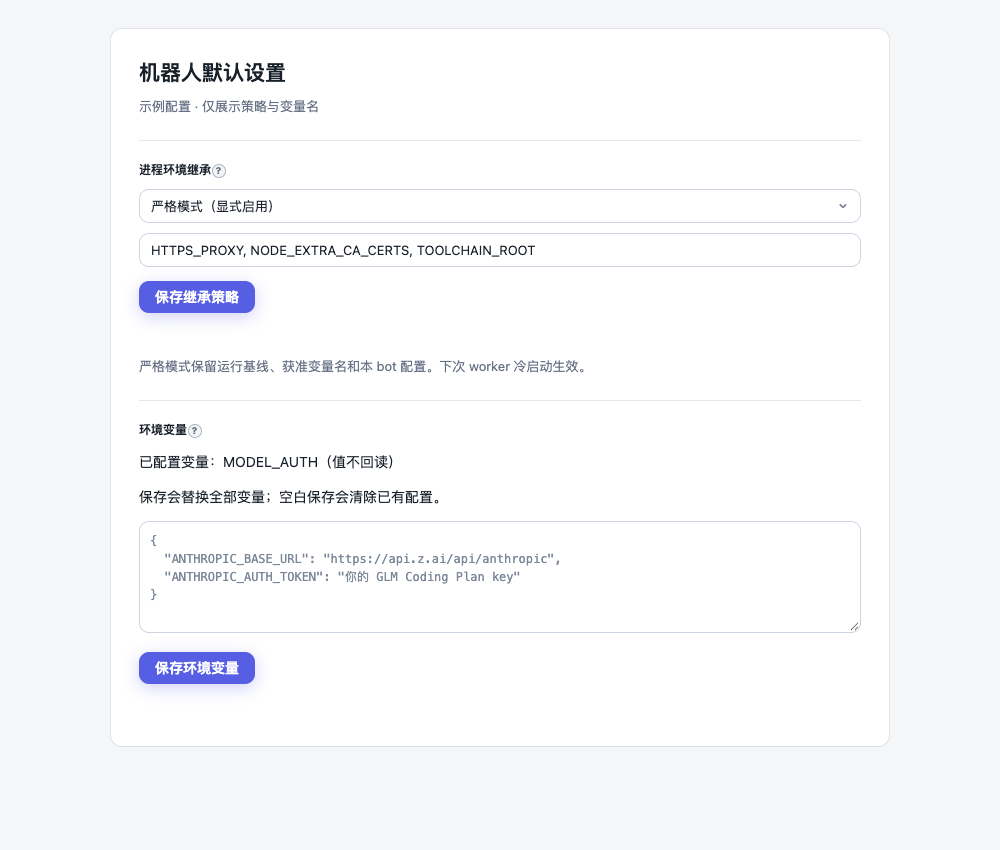
Omit envPolicy or use { "mode": "inherit" } to retain historical host inheritance and mandatory credential/session-marker filtering. Strict mode uses exact approved names:
The fixed baseline contains PATH, HOME, user identity, temporary directories, standard locale, terminal and XDG paths; see src/core/env-policy.ts for the complete list. inherit adds exact names without wildcards. Proxy, CA, toolchain and model-auth variables require explicit approval here or this bot's env. Configured env wins over inherited values and stays per child/pane. Botmux injects its own identity/control variables; reserved names including BOTMUX*, __OWNER_OPEN_ID and CODEX_HOME cannot be overridden or inherited as user grants. Non-reserved adapter variables such as TRAE_HOME and CLI_EXTRA_ARGS also require an explicit inherit grant or a value in this bot's env. Process-level GROK_HOME, DSH_HOME and LARKSUITE_CLI_DATA_DIR may be explicitly inherited. Mandatory sensitive-variable filtering remains enforced in strict mode.
Set the policy in Dashboard under “Process environment inheritance”, with botmux env-policy set '{"mode":"strict","inherit":["HTTPS_PROXY"]}' with --bot to select the target bot, or /botconfig set envPolicy {"mode":"strict"}. Unset restores historical inheritance. Malformed policies, unknown fields and reserved names fail closed.
Combining network policies: When using a version that provides sandboxNetworkPolicy, the HTTPS_PROXY example above must also satisfy this table. An exact environment grant controls whether a value reaches the CLI; it does not authorize network access or silently remove/rewrite a proxy.
trusted-egress neither creates a proxy, grants environment variables nor guarantees the CLI uses it. Authorizing an exit does not restrict destinations behind it. If a model requires a proxy, do not simply remove its inherit grant to pass validation: explicitly trust the exit and configure endpoint rules plus deployment-layer ACLs, or first establish direct model authentication, permitted destination CIDRs/ports and DNS. Network policies still require Linux, a fresh local PTY and sandbox: true / "oncall"; persistent backends such as tmux, adopt and external App Servers remain rejected regardless of trusted-egress or envPolicy. See network sandbox documentation.
Online changes apply on the next worker cold start. The offline terminal command updates bots.json; an already running daemon must be restarted to reload an offline edit. CLI restarts within a live worker retain its frozen policy. Persistent restore compares a secret-free policy fingerprint: absent, corrupt or mismatched strict generations must terminate with a confirmed missing probe before cold start; unconfirmed teardown refuses launch. Environment already read by a live CLI cannot be revoked through a hot update.
Strict mode covers Botmux-owned PTY, tmux, tmux-pipe, zellij, zmx, local Codex/TraeX RPC App Servers and title subprocesses. tmux/zellij exec /usr/bin/env -i directly and skip launchShell profiles. zmx uses a fixed shell without user profiles and an empty-environment exec. Supply PATH/nvm/mise configuration explicitly. Shared-server globals are not cleared wholesale; existing mandatory sensitive-variable scrubbing still applies. Strict panes reset inherited environments and granted credentials never seed shared globals. Strict panes default to TERM=xterm-256color when it is absent and preserve explicitly configured values. v3 workflows freeze the secret-free policy and resolve per-bot env at execution time rather than persist credentials into bot snapshots.
Herdr, Riff, Mojo, Forge launch mode, adopted processes and externally owned App Servers cannot currently establish this boundary, so strict mode refuses those paths. Shells/profiles deliberately invoked by a CLI, credential/config files, OS file permissions and cloud identities remain outside this feature. Per-bot CODEX_HOME, codexAuthSync and file sandbox behavior remain independent.
Dashboard reads only configured names. Its env form is write-only: saving replaces the complete map and saving blank clears it. Strict sessions do not return credential-bearing reproduction commands. Diagnostics show names/policy only. Explicit bot values are still plaintext in bots.json and process environments; this is not a secret vault.