
Streaming Cards
Every conversation turn produces a live-updating Lark card, your primary window for perceiving and controlling the CLI on your phone or in Lark.
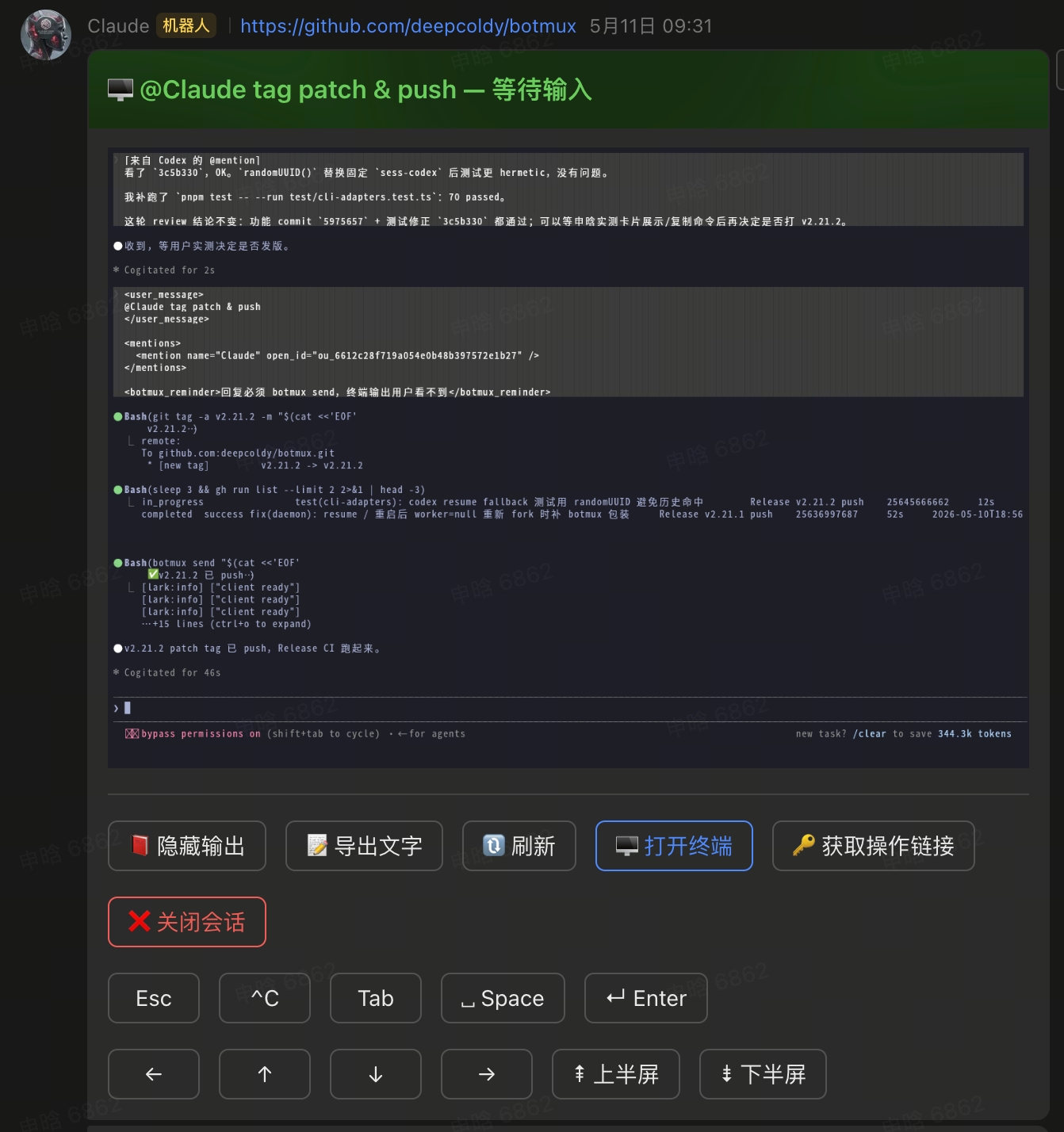
- Live screenshots of the terminal refreshed onto the card: xterm renders headlessly into an image that faithfully reproduces the CLI's TUI (borders and colors are all there), instead of converting output to Markdown. One click to "Show / Hide output," "Export text," and "Half-page up / down."
- Live status indicator: the card's header color is the status (a Lark card template, not an emoji dot in the body) — Starting… (yellow) → Working (blue) → Waiting for input (green); when the quota is used up it shows Limit reached (red), turning to Retryable (green) when it can retry.
- Operate directly from the card: open the Web terminal, 🔑 grab an operation link, close the session, and — when the quota is retryable — "🔁 Resend last task."
- A fresh card per turn: the previous card freezes as an archive, keeping conversation history clear and traceable; after a session is moved to another group with
/relay, the original card also automatically freezes as an archive (buttons removed). - A "recoverable" card on close: it carries a "▶️ Resume session" button to click back in anytime; if the CLI supports native resume (the adapter implements
buildResumeCommandand a native session id exists), it also includes the native command (e.g.claude --resume <id>) for manual recovery; when unsupported, only botmux's resume button plus a short note is shown.
The four display layers of a turn
botmux's "presence" in Lark has four independently switched layers:
Reactions and streaming cards are mutually exclusive per turn: the ✋→✅ reactions appear only when "streaming cards are off for this chat" — with no live status window, the reaction is the only lightweight progress signal; a card-enabled chat gets no reactions.
Card / thinking switches: bot-level vs per-chat
A per-chat override wins over the bot-level default and affects only that chat.
/card and /cot are admin-only (allowedUsers, canOperate), status subcommands included. The reason: Lark cards have no "show different views per person" capability — these switches are bot-level / chat-wide, so one change alters what everyone in the group sees; guests (talk access, no operate rights) get an "authorized users only" notice.
Quiet preset (Dashboard Bot Defaults page, new in this batch): one click performs a one-time linked write — cotEnabled:false + silentTurnReactions:true + disableStreamingCard:true — for groups that only want the conclusion, quietly. It is not a persistent binding: it simply writes those three existing switches to the values above once and shows a toast; turning the preset off later does not revert the three values, so re-enable each switch manually if you want it back.
Pinning The Current Live Card
When a bot enables pinStreamingCard, Botmux tries to pin the current public live-status card to the top of the chat so the close-session and terminal entry points stay easy to reach.
- This is a per-bot, opt-in, default-off setting.
- Pinning is still chat-wide at the Feishu layer, while each active session keeps its own current/frozen streaming-card lifecycle. If the same chat has multiple active topics or multiple bots, you may therefore see multiple independently managed group-level Pin entries.
- Only the current public live-status real
streamCardIdparticipates. - Repo-picker cards, private
/cardsnapshots, final reply cards, CoT, closed cards, and every other interactive card stay out of scope. - After the switch changes through the dashboard or
/botconfig set pinStreamingCard on/off, Botmux immediately runs a best-effort hot reconciliation across that bot's existing active sessions; the configuration response itself does not wait for Feishu Pin/Unpin completion. /card pin offis the per-chat escape hatch: it stops Botmux from pinning streaming cards in the current chat while keeping live cards themselves enabled./card pin onrestores Pin for that chat, and/card pin statusreports whether Pin is off at the bot level, opted out for this chat, or effectively on.- Failures are fail-open: they never interrupt card publication, transfer, resume, close, or the configuration write. During exceptional periods you may temporarily see zero Pins or multiple Pins.
- The feature keeps no durable retry journal, and startup recovery remains deliberately narrow. On restart, Botmux lists the chat's current Pins as the single ownership authority for persisted cards: a remote Pin counts only when Feishu reports
operator_id_type: "app_id"for the samelarkAppId, and cleanup is further restricted to the strict intersection with the enqueue-time local candidate IDs already known to this process. An already-Pinned current card with human, other-app, mixed, or malformed provenance is left untouched and is not re-pinned. If the current card is absent, Botmux accepts a create only when the returneddata.pinrepeats both the exact message ID and same-app provenance. Botmux never broad-cleans arbitrary remote Pins, and any lookup or Pin API failure stays fail-open. Explicit bot-wide/per-chat off cleans process-owned IDs plus locally known IDs freshly proven same-app; ordinary disable, close, and transfer clean process-owned IDs only.
Open terminal = read-only: the card's main "🖥️ Open Web Terminal" button is read-only viewing; for writable control, tap "🔑 Get operation link" — delivered privately: a flat group prefers an in-chat "visible-to-you" ephemeral card (so you never leave the conversation), falling back to a DM only for topic/thread or p2p chats, or when the ephemeral card fails. Management buttons like "🔄 Restart" and "apply profile" live on the session card, not on each turn's streaming card.
Interrupting / correcting a running turn
To stop or correct it mid-turn, don't wait for it to finish: in screenshot mode the card carries a row of quick keys at the bottom — Esc, ^C, Tab, Space, Enter, arrow keys, ⇞ Half-page up / ⇟ Half-page down. Tapping Esc writes the ESC byte straight into the live terminal (exactly like pressing Esc locally); ^C likewise. After interrupting, just add a new instruction.
This quick-key row only appears when output is shown (screenshot mode) and the backend isn't
riff— "Show output" first, then Esc is available. The default behavior is not to interrupt the current turn; new messages queue (type-ahead) and are fed in after the turn ends. To correct immediately, use Esc to break first.
Messages the CLI proactively sends
The card body is a live screenshot (image) of the terminal, not text rendering. Messages the CLI proactively sends (via botmux send) are separate rich-text / image-and-text messages that can carry images, files, and @mentions; for fully custom display, --card-file / --card-json can send raw interactive card JSON.
⚠️ Raw cards allow display-only elements + open_url buttons only: any callback-firing control — callback buttons (with a
value), dropdown / person selects, date-time pickers, inputs, form submits — is rejected. This prevents custom cards from forging interactive callbacks.
Charts in messages (vega-lite)
A ```vega-lite fence in a botmux send body renders as a native Feishu Card 2.0 chart; other channels such as a Web view can render the same Vega-Lite directly. Supported subset:
- Inline
data.valuesonly, at most 500 rows, values are string / number / boolean / null. mark:bar(horizontal when only x is quantitative),line,area,point,arc(pie;innerRadius > 0for a donut). A pie takes onlytheta(value) +color(category);x/yare rejected andthetahas notitle.- Encoding channels:
x,y,color(series),theta(pie value); each channel accepts onlyfield,type,title.x/ytitles become axis titles and thecolortitle becomes the legend title.type: temporalis not parsed as a date: values are shown as categories in the given order, so sort them first. - At most 5 charts per card. The real limit is Feishu's 30KB card message request body (including the envelope and the re-serialized
content): once the card is assembled, charts that do not fit step down chart → 50-row data table → 10-row data table → notice only until the card fits. A single spec source is also capped at 30KB for parsing.
Safety: the host rebuilds the VChart spec from recognised fields and never forwards the source JSON. data.url, transform, params, expr, signal, datasets, layer and similar are rejected. Unsupported or over-budget charts degrade to a one-line notice plus a plain-text data table (cells never become links or mentions), botmux send prints the reason on stderr, and the message is still delivered.
botmux send --dry-run previews the rendering: it prints {dryRun, bytes, fits, diagnostics, card} (bytes is the Feishu request body size) without sending and without a session. It renders the body only (no image/file upload, mentions or footer).
Updating a card after sending (card patch)
A successful botmux send --card-file/--card-json prints {"success":true,"messageId":"om_...",...}. botmux card patch updates that same card in place by its messageId — no new message, same chat/topic — which makes it ideal for progress cards:
- The replacement card JSON goes through the same safety validation as sending (display-only + open_url; callback controls are rejected).
- The
sendexamples pass--no-mention: a progress card doesn't need to @ anyone, and explicitly opting out avoids the mention-policy gate (exit 2). - Bot identity is resolved from the session context (same as
send); errors such as a withdrawn message, missing permission, or a non-card target are surfaced as-is (exit 1). - Success prints
{"success":true,"messageId":"om_xxx","sessionId":"..."}(JSON only on stdout); usage errors exit 2.