
Slash Commands
Just send these commands directly in a topic, and the daemon intercepts and handles them. Only the allowlisted commands in the passthrough section are forwarded verbatim to the underlying CLI; any other /xxx the daemon doesn't recognize is treated as ordinary conversation text and relayed as a normal message. Send /help anytime to view the full list.
📌 Session Management
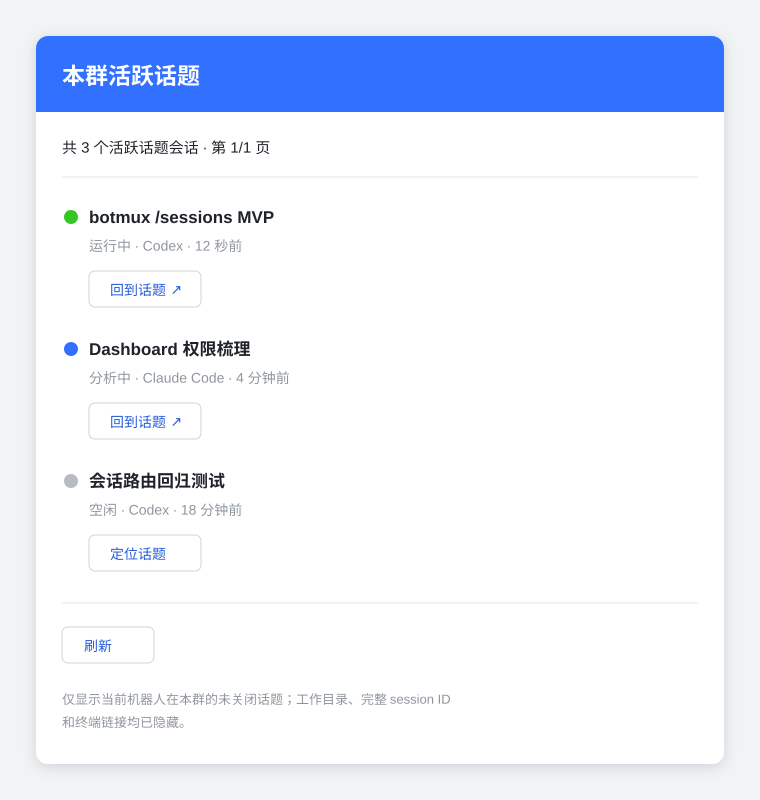
/sessions card preview:
See Session & Topic Model for the repository-picker and pinned-directory branches of bare /t.
The header directives:
/repo <path|project name>— pin the repository directly, skipping the picker card. Note it takes exactly one token: quote a path containing spaces, as in/repo "~/Code/my project"./repo(no argument) — start right away in the default working directory, the same as the picker card's start-directly button./repo wt <path|project name> [branch]— create a fresh worktree on that repository (off the remote default branch) and start the session inside it. The branch may be omitted (auto-named from the title / first task); when given, it is only taken from the next word on the same line as the repo that looks like a branch name (ci/temp_splitand the like), so a Chinese first task is never swallowed, but start a latin first task on a new line. An invalid branch name or an existing target directory is rejected before the topic is opened; if git itself fails, the topic exists and the session waits in repo selection. Resending while creation is still running is told to wait; after failure, send/repo <path|project name>or/repo wt <repo> [branch]in the topic — the earlier message stays queued./model <model>— the model to launch with this time. Only available on CLIs that can actually carry a model in their launch arguments; the rest reject it rather than ignoring it silently./effort <level>— reasoning effort (low/medium/high/xhigh/max/ultra), validated against the model this launch will actually use.
The whole message can be written on one line or split across lines — the result is identical:
With no first task (e.g. /t /repo botmux), the CLI boots idle and waits for your next message instead of answering an empty turn.
A few boundaries:
- A header only takes effect on the first message of a new topic. To change repository/model/reasoning effort inside a running topic, send
/repo,/modelor/efforton their own; use/renameto change the title. - The header's
/repo wtdoes not accept the numeric form (numbers only mean something on the picker card); the in-session/repo wt <N|project name> [branch]still does. - A standalone mid-session
/repostill takes the rest of the line, unlike the single-token rule inside the header.
💬 Reply Mode (/reply-mode)
Controls how the bot opens a session when @mentioned. No argument (or status) shows the current mode; changing it needs canOperate, viewing needs canTalk. In group chats you must @ the target bot (in multi-bot groups, @ the specific bot). Only regular groups and 1:1 DMs are supported; topic groups need no setting (they're already topics) and the command is rejected there.
DM (1:1) — the mode applies to all of this bot's DMs (bot-level global config, not per-chat), but different users' DMs with the bot still keep isolated sessions. The modes are chat / topic / group (new-topic is a compat alias of topic):
shared / chat-topic rely on native group topics and are rejected in DMs.
Regular groups — how top-level @mentions open sessions (per-chat override, higher priority than the dashboard default):
The group-level setting overrides the dashboard "Bot Config → Regular Group Mode" default.
/substitute [status|on|off] — show or toggle substitute mode for the current group (owner-only to change).
📢 Mention Policy (/mention-mode, regular groups only)
/mention-mode always|topic|never|ambient switches this chat's policy; /mention-mode status (or no argument) reports it. Regular groups only: DMs never need @, and topic groups and /group session groups reject the command. Querying needs only talk access; changing needs operate rights (allowedUsers).
always: @ required to get an answer (default);topic: replies inside the bot's own topics skip @;never: no @ required anywhere in the group;ambient: no @ required, but the bot yields when a message explicitly @-mentions someone else.- Skipping @ never skips the permission gate, and 8 no-@ exceptions still apply (in-topic replies, substitute triggers, the message listener, and more) — see Mention Policy for the full semantics.
📑 Chat Tabs
Built-in Lark tabs are read-only through OpenAPI, though they must still be included when sorting. If the chat only allows its owner and administrators to manage tabs, the bot also needs that chat-level privilege.
AI agents and background scripts should use the CLI instead of sending a slash command into the chat:
The CLI resolves the bot and chat from the current BOTMUX_SESSION_ID. Use --session-id outside the current process tree or --chat-id to override the destination. add is idempotent by URL: an existing page tab is reused and renamed when needed. This works for merge requests, project boards, release pages, and other automation scenarios. Background callers can also use botmux tabs list|update|remove|sort.
🔀 Passthrough to the Underlying CLI
/compact /model /clear /plugin /usage /new /context /cost /mcp /diff /code-review /security-review /review /btw /effort /fast — delivered literally to the underlying CLI and handled by its built-in commands.
/fast is Codex-specific: it toggles Codex's native service tier, and the streaming card shows a read-only ⚡ <tier> badge reflecting whatever tier Codex actually runs. On RPC-input or Riff backends the keystroke can't reach Codex's executor, so /fast fails closed there with a clear notice instead of a silent no-op.
Some CLIs also declare adapter-default passthrough commands: Claude Code and Codex default-allow /goal, so a new topic whose first message is /goal ... will start/select the repository first and then send /goal ... to the CLI literally.
To allow more commands through, configure customPassthroughCommands for that bot (e.g. ["/export"]) to extend beyond the allowlist above as needed. Entries that would shadow a botmux daemon command (such as /status, /help, /cd) are automatically dropped — daemon commands always keep their own semantics and cannot be overridden via passthrough.
Cascading several passthrough commands in one message (inside a running session): put one passthrough command per line, optionally followed by a task body, and botmux sends them in order, waiting for the CLI to become idle between items —
Rules: only a leading run of passthrough lines forms a cascade (a botmux command such as /cd or an unknown /xxx inside that run makes the whole message ordinary text, as today); the body starts at the first line not beginning with /, and any later /xxx is part of the body; a single line such as /model opus then continue is still sent verbatim as one line. The idle wait is capped at 120 s, after which the remaining items are sent immediately with a notice. Remote sandbox backends (riff / mojo) and adopted external sessions do not support cascades and reply "send them one by one"; messages with attachments are not split either.
🧩 View Available Commands
/list-slash-command (alias /slash): lists the currently available slash commands in a card, in four sections —
- botmux's fixed passthrough allowlist;
- commands default-allowed by the current CLI adapter;
- commands this bot custom-allows via
customPassthroughCommandsin bots.json; - custom commands / skills / plugins auto-discovered from the
.claudedirectory (project-level +~/.claude+ plugin cache), shown in a paginated "command | description" table, with a note of any detected MCP server names.
Permissions are the same as /help, and it doesn't occupy a session slot.
📡 Session Onboarding
🔐 User Authorization
Basic authorization requires the app to enable im:message:readonly, im:resource, and offline_access. If another operation returns missing_scope, request the names reported by the error with /login --scope ...; the app administrator must first enable those user permissions in the developer console. Resource visibility/access errors require access to that resource, not another /login.
🎭 Roles (Personas)
See Roles & Teams for details.
🔀 Session Relay (Regular Groups)
See Session Relay for details.
🛎️ On-Call (Group Chats)
/oncall bind <path> · /oncall unbind · /oncall status
🔑 Usage Authorization (owner / admins)
Layers, quotas, grant request cards, and the block list are documented in Permissions & Access. Note: being added to a group is not authorization — a restricted bot still accepts only listed members.
⚙️ Remote Config & Skills (owner-only)
Written and hot-applied — no restart needed.
🆕 One-Click New Session Group
/group <group name> (alias /g): automatically creates a new Lark group, invites you in, transfers ownership to you, and runs the entire group as a standalone CLI session. @botA @botB /g <group name> can add multiple bots into the new group at once.
Add --role-profile <profile> to bootstrap the new group with reusable per-bot roles:
See One-Click Session Group for details.
📌 Upgrade an Ordinary Group to Project Mode
In the top-level ordinary-group chat, mention the Bot that should coordinate the project:
The addressed Bot becomes coordinator and the other bots in this group that are managed by the same Botmux host become workers. The command writes the same source of truth as Dashboard and immediately sends and pins the getting-started card. A settled project goal is not required; discussion can begin first in the top-level chat. Command-based enablement turns on “automatically enroll new bots” by default, so newly joined bots managed by the same host enter the worker allowlist independently of the auto-start-on-join setting.
On every project turn, the coordinator receives Botmux's fixed project-state protocol: read durable state first, then persist material changes to the goal, phase, current work, remaining plan, blockers, or milestones. This protocol is injected separately from custom Roles, so Role wording and once-only Role injection cannot disable it. On first initialization, Botmux sends and pins a fresh formal project card at the current point in the timeline, then unpins the getting-started guide; later progress updates patch the formal card in place.
@bot /project status: show the coordinator, workers, and whether a project has started.@bot /project roles: Reply in the current group with a focused role card for this project’s coordinator and workers; only the admin who opened the card can operate it. Saving reuses the per-chat/rolefiles and follows the bot’s existing injection policy: every-turn mode applies on the next message, while once mode applies after a new or rebuilt session.@bot /project disable: leave project-group mode; an unused guide is unpinned, while existing project state is retained for a later re-enable.
The command works only in ordinary groups and only for the Bot's owner/allowedUsers. Repeating enable preserves any worker subset and auto-enrollment policy already curated in Dashboard. Dashboard can disable “automatically enroll new bots”; when disabled, the explicit worker list remains unchanged. Dashboard also lists the same project agents and deep-links to their group-role editors; both entry points share one role source of truth.
🧠 Group Context Sharing
In a real Lark group, mention any bot managed by this deployment:
The switch is group-wide and off by default. Once enabled, bots managed by this deployment passively retain published messages from the group. A bot that was not mentioned stays asleep. On its next activation under the existing mention policy, it receives attributed background it missed. The switch does not change mention routing or create a model turn or session merely to deliver background.
Only a human owner/member of that bot's allowedUsers can inspect or change the switch; ordinary talk grants and other bots do not qualify. DMs and API virtual sessions are unsupported. Sessions configured with promptInjection=none explicitly do not receive automatic background.
By default, injected background is bounded to 24,000 characters per turn, while stored group observations are retained for 30 days or 10,000 messages. Injected background counts toward the activated model's input tokens, but passive observation does not call a model. Scope is limited to published group messages and resource references; it excludes DMs, hidden reasoning, unpublished tool results, and private files. If platform backfill is incomplete because of history limits, permissions, or retention, the background carries an incomplete-range marker instead of presenting the gap as complete history.
status and successful enable responses also show a recall-event subscription diagnostic. Only a subscribed reason means the app configuration was verified to include im.message.recalled_v1; this does not promise 100% push delivery. update_submitted means an update was submitted but still requires publishing a new app version in Lark Developer Console. Unknown, unavailable-login, or stale results mean historical background may temporarily retain recalled messages; inspect that event subscription and retry. Disabling performs no subscription check or setup action.
📄 Feishu Doc Comment Entry
/watch-comment: watch Feishu doc comments, bind them to an AI session, and post replies back into their threads; supports <doc link> [--dir <path>] [--all|--mentions-only] and list/off. /subscribe-lark-doc keeps the original per-file Feishu API subscription flow. See Feishu Doc Comment Entry for details.
🔧 Workflow (orchestration, experimental)
The old
/template run|cancelcommands are retired; sending/templatenow returns a retirement notice.
See Workflow for details.
👥 Multi-Bot Collaboration
@botA @botB /t <prompt> (each opens a new topic) · @botA @botB /introduce (register the bots in this chat with each other by open_id for precise collaboration mentions) · botmux bots list (show bots available in the current group)
⏰ Scheduling & ❓ Help
/schedule ... (see Scheduled Tasks) · /help (shows the full list inside the topic)