
Feedback Storage & Migration
botmux keeps "feedback data" in a database: user ratings of final answers, the outcome of each turn, the delivery queue for feedback webhooks, and so on. This is what the Dashboard "Feedback analytics" page shows.
- SQLite by default: a local file,
botmux-feedback.sqlite, in the botmux data directory (~/.botmux/data/by default). Nothing to install, and most people never need anything else. - PostgreSQL if you want it: switch when you need central storage, backups, or to plug the data into your own analytics.
You switch storage with the botmux feedback storage command or with the "Feedback storage" panel on the Dashboard "Feedback analytics" page. Both can do the same things.
Which should I pick?
If the first start does not run in an interactive terminal (for example from a script), botmux uses SQLite without asking.
Three things to know before migrating
- Service pauses during migration: once the "maintenance window" starts, new topics, new turns, and
botmux sendare refused, and restarted daemons wait, until the migration completes or is cancelled. Pick a quiet time. - No automatic fallback: after switching to PostgreSQL, botmux will not switch back to SQLite on its own if the database fails. The old SQLite file is kept but marked "retired" and no longer written.
- Passwords never go on the command line or in the config file: only "secret references" are allowed, see How to supply the password.
Switch from the command line
Step 1: Prepare a config file
Create a JSON file, for example pg.json:
Extra fields (such as a password key) are not allowed and the file will be rejected.
Step 2: Save it as the candidate and test it
configureonly saves it as the "candidate" config. It does not switch and does not touch any data.testconnects to the database and checks that the account has theCREATEprivilege on it (botmux needs it to create its own schema and tables).statusshows the active storage (active), the candidate (candidate), and past migration jobs. Runningbotmux feedback storagewith no subcommand also showsstatus.
All commands print JSON. On error they print {"error":"feedback_..."} and exit with code 1.
Step 3: Migrate
--yes confirms that you accept the maintenance window; without it the command is refused. The command runs until it finishes and prints something like:
phase: complete means success (exit code 0), and feedback data now goes to PostgreSQL. Along the way it passes through these phases:
If phase is blocked, the migration is stuck. See the next section.
Stuck: resume or cancel
When blocked, blockers tells you why. The maintenance window does not end on its own after a block, so new turns stay blocked until you pick one:
cancelneeds--yes,--reason(why you cancel), and--evidence(what you checked, such as a ticket number). They are kept in an audit record.- Cancelling only restores SQLite. Data already written to PostgreSQL is not deleted.
- Once SQLite has been marked retired (after the
retiringphase finishes), you cannot cancel. Useresumeto finish.
Common blockers:
No existing data: enable directly
If SQLite has no feedback data yet, you can skip the migration:
If SQLite holds even one row, enable-empty refuses (feedback_storage_migration_required). Use migrate instead.
How to supply the password
To keep passwords out of shell history and config files, the command line rejects --password and --token, and the config file only accepts references:
With env:, the variable must exist both in the terminal where you run botmux feedback storage and in the environment of the botmux service itself, or the service cannot read the password after the switch. The simpler route is to type the password into the Dashboard panel: it is saved as a file readable only by the local user, the config keeps just a reference, and the page never shows it again.
Switch from the Dashboard
Open the Dashboard "Feedback analytics" page and expand "Feedback storage". Only host admins can see this panel.
The screenshot is from an earlier version. The current panel also has an "Authentication" dropdown next to "Backend".
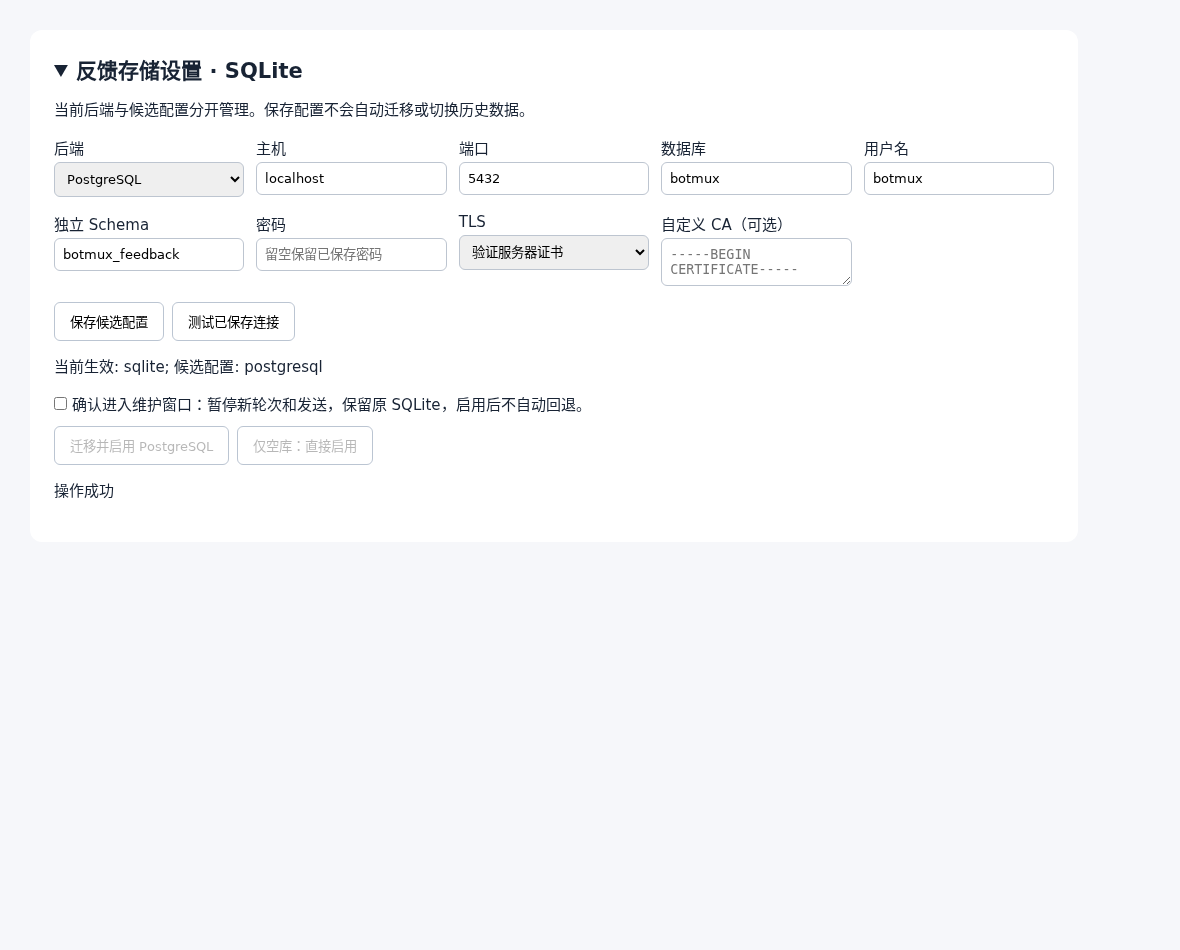
- Set "Backend" to PostgreSQL and "Authentication" to "Username / password", then fill in the connection details. Leaving the password blank keeps the previously saved one.
- Click "Save candidate settings", then "Test saved connection". The panel shows "Active: sqlite; Candidate: postgresql".
- Tick "Confirm maintenance", then:
- with history: click "Migrate and enable PostgreSQL";
- with no data: click "Empty database: enable directly".
- The migration runs in the background. The panel refreshes every few seconds and shows
<migration ID>: <phase> <reasons>at the bottom. Settings are locked while it runs. - When it is
blocked, a "Resume original migration" button appears (the confirmation box must be ticked). It does the same asresume.
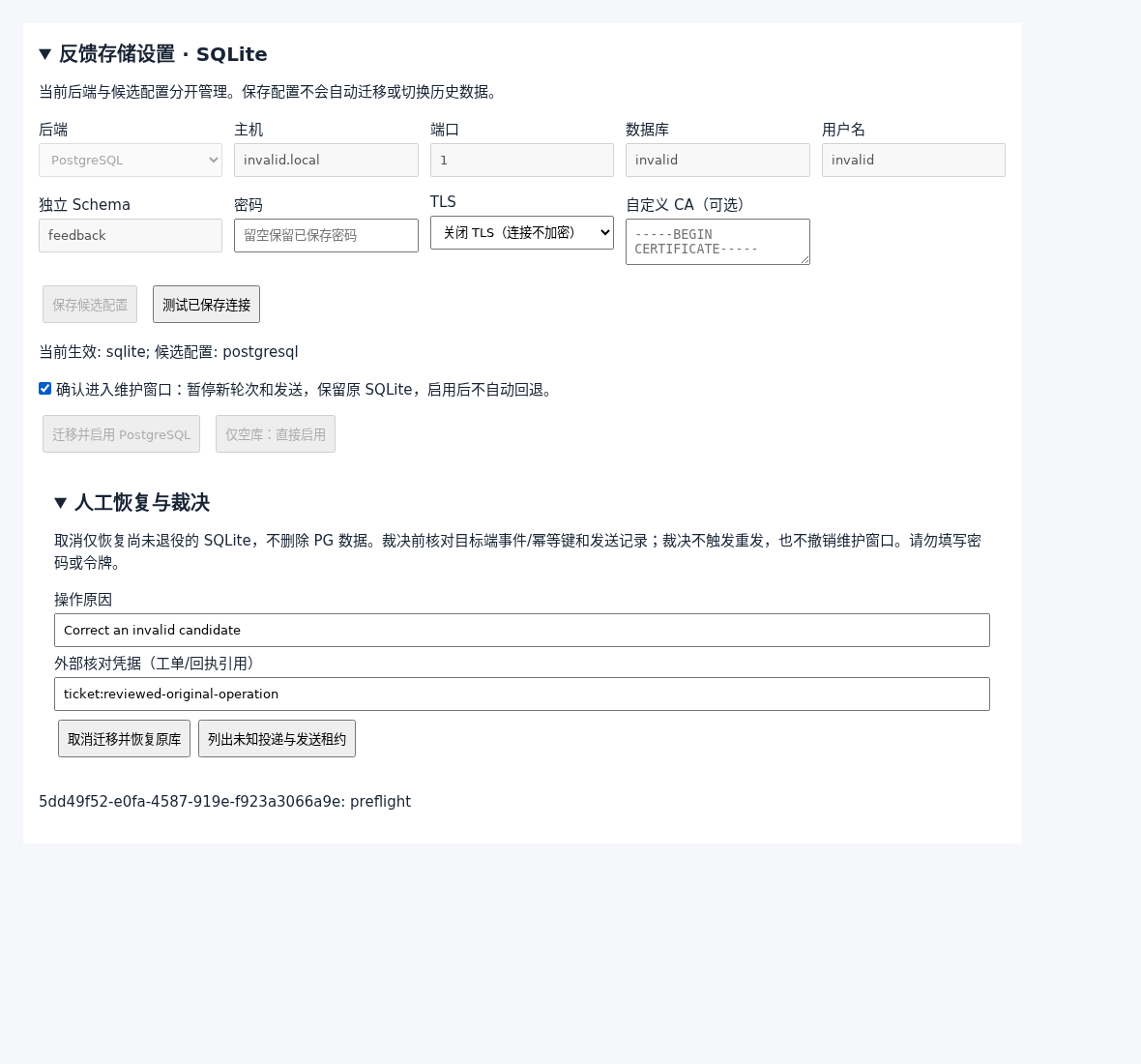
To cancel, expand "Manual recovery and resolution" below, fill in "Reason" and "External verification evidence", keep the confirmation box above ticked, and click "Cancel migration and restore source". The button only appears while a migration is unfinished.
Delivery recovery items
Before migrating, botmux must be sure nothing was "sent with an unknown result", or the data might not line up. There are two kinds:
List them:
First check on the other side whether it actually arrived (for example the webhook receiver's logs, or whether the message is in the Feishu chat), then record your conclusion:
- Copy
--idand--fingerprintfrom therecovery listoutput. If the item changed in the meantime you getfeedback_recovery_stale; just list again. - Items still in progress (
live: true) cannot be acknowledged. Wait for them to end. - Acknowledging only records your decision. It does not resend and does not end the maintenance window. Run
resumeafterwards.
On the Dashboard, the "List unknown deliveries and send leases" button in "Manual recovery and resolution" does the same thing, with an "Acknowledge verified outcome" button under each item (it also needs the confirmation box ticked and a reason and evidence filled in).
Scripted installs
For automated deployments, set the environment variable BOTMUX_FEEDBACK_CONFIG_FILE to the config file from Step 1. botmux start then saves that config and enables it directly as an empty database (same as enable-empty), without asking. If the config matches the active one, nothing happens.
This is only for fresh installs: if SQLite already has data, it fails with feedback_storage_migration_required. Migrate instead.
FAQ
Can I go from PostgreSQL back to SQLite, or to another PostgreSQL? Not yet. Migration only supports SQLite → PostgreSQL.
How long is the downtime? It depends on the data size: running turns must finish, then the data is imported and verified table by table. With modest data it is usually quick. Do it off-peak.
Is the old SQLite file still there afterwards?
Yes. botmux-feedback.sqlite stays in the data directory, retired and no longer written.
Getting feedback_storage_generation_conflict?
The config was changed elsewhere while you were working (for example in an open Dashboard). Run status again and retry. You also get it if you run enable-empty without saving a candidate with configure first.
Related pages: Bot config (bots.json) covers the final-answer feedback card; Dashboard introduces the "Feedback analytics" page; other commands are in CLI commands.